I Made My Own Aternos, Here's Why and How
“Call it overengineering until the day it isn’t.”
So, What’s Aternos Anyway?
If you’ve never heard of it: Aternos is a free Minecraft server host. You get about 2 GB of RAM and a 4 GB file size cap, no credit card, no catch (mostly). For a small server with two or three friends messing around, honestly? That’s plenty.
Where It All Started
The first time I ever played Minecraft with friends on an actual server, it was on Aternos. We ran a light modpack, laughed way too much, and by the end of it I wasn’t even thinking about the tech behind it, just having fun. Those are genuinely some of my favorite Minecraft memories. I don’t think that changes just because I eventually outgrew the platform.
But Then Things Got… Complicated
Here’s the thing nobody tells you when you start out small: the moment you add more people, or start throwing mods into the mix, everything starts falling apart. Slowly at first, then all at once.
A few of the specific pain points that finally pushed me over the edge:
- The queue. You wait in line just to start playing. Every once in a while you get an “instant start” that works, and it’s just enough of a taste to make the normal wait feel worse.
- Latency. Around 120 to 150ms in my region by default. Combat feels like wading through syrup.
- Crashes, constantly. The second everyone starts exploring at once, chunk generation chokes. Memory runs out. The server just dies, no warning, no goodbye.
- The modpack ceiling. That 2 GB limit basically rules out anything interesting. Modern Forge or Fabric setups want 4 to 8 GB just to say hello.
At some point I stopped asking “how do I work around this” and started asking “why am I working around this at all.”
Okay, But Why Not Just Use Pterodactyl?
Fair question. I asked myself the same thing.
Existing panels like Pterodactyl are built to host basically any game under the sun, and that flexibility comes with baggage. Even for a simple setup on my own hardware, I’d have needed static public IPs, domain mappings, reverse proxies, the works. I didn’t want a Swiss Army knife. I wanted a screwdriver, specifically shaped for Minecraft and nothing else.
There was also a resource argument. A lot of existing panels are hungrier than I’d like, and every megabyte they eat is a megabyte the actual Minecraft JVM doesn’t get. The whole point was to get out of the game server’s way, not compete with it.
And honestly? Part of it was just wanting to self-host. I had a decent laptop doing nothing useful, and turning it into a home server meant full control over the hardware and zero recurring cloud bills. Who doesn’t like the sound of that?
Quick Detour: What’s Tailscale?
Worth a quick explanation before I go further. Tailscale is a mesh VPN, it lets devices talk to each other securely over the internet like they’re sitting on the same LAN, without you opening ports or needing a static IP. Since everything was running off a home laptop, this mattered a lot. I could reach the panel and the server from anywhere, and my friends could connect without either of us fighting port forwarding or an ISP that hands out a new IP every other week.
Version 1: The Weekend Project
I already knew Rust, so picking it for the backend wasn’t really a decision, more of a default. For the frontend I went with Next.js, mostly because I like it more than raw HTML and I don’t have any strong feelings about framework purity for a tool only I was going to use.
The hardest part, by far, was getting single-instance startup working reliably. Once that clicked and RCON was wired in, everything else came together fast, since RCON let me query almost anything I needed. From there I bolted on file access (upload, browse, edit), basic user accounts, and the ability to send commands remotely. I used Clerk for auth early on, mostly to avoid thinking about it.
What it still couldn’t do:
- Run more than one instance at a time
- Give people fine-grained control over what they could touch
- Let me pick a specific Java version per server
The way I was bending Clerk’s roles to fit my needs got hacky fast, so for version 2 I ripped it out entirely and wrote my own bearer-auth system from scratch.
Version 2: McAdmin
This is where it stopped being “a thing I hacked together” and became a project I was willing to actually name: McAdmin.
It’s split into two pieces: a Rust daemon called McAdminWorker, and a Next.js dashboard called McAdminConsole. Together they gave me multi-instance support, live telemetry over full-duplex WebSockets, per-server Java version switching, an 18-permission role system, and my own homegrown auth, all without a database, and with the daemon staying under 20 MB of RAM.
Let me walk through the stack piece by piece, because every choice here was deliberate.
The Backend: McAdminWorker (Rust)
The daemon runs right next to the Minecraft processes it’s managing, so keeping it lightweight wasn’t optional.
| Piece | Why it’s there |
|---|---|
| Rust (2024 Edition) | The game server is already fighting for memory and CPU. The daemon shouldn’t add to that fight. A compiled Rust binary sits under 20 MB with no garbage collector pausing things. |
| Axum 0.8 + Tower-HTTP | Built by the Tokio team. Type-safe routing, clean extractors, native multipart streaming, and Tower middleware for CORS, tracing, and auth guards without extra plumbing. |
| Tokio (async runtime + channels) | Runs the event loop handling I/O, background telemetry, and child processes without blocking anything. tokio::sync::broadcast and Mutex handle the chatter between tasks. |
| Full-duplex WebSockets | This is what replaced polling with actual live console streaming, telemetry, and instant commands. |
| Argon2id + jsonwebtoken | Argon2id resists GPU brute-forcing. Paired with HMAC-SHA256 JWTs, it gives stateless auth that works over both headers and cookies. |
| circular-queue | Console logs pile up fast. A plain vector would leak memory forever. A bounded ring buffer keeps the last ~1,000 lines with O(1) reads and writes. |
| sysinfo | Grabs CPU, memory, and per-process JVM stats with almost no overhead, no need for a separate metrics stack. |
| rcon-tokio | An async Source RCON client, so commands go through a real protocol instead of getting piped raw into stdin and hoped for the best. |
The Frontend: McAdminConsole (Next.js & React)
This is the part I actually stare at every day, so it needed to feel fast and stay out of my way.
| Piece | Why it’s there |
|---|---|
| Next.js 16 + React 19 | Fast initial loads plus rich interactivity for live terminals, permission toggles, and property editors. |
| Native WebSocket client | Keeps a persistent connection to /api/instances/{id}/ws, handles reconnects on its own, and catches up on missed logs automatically. |
| TypeScript 5 | Keeps the frontend’s types in sync with the Rust backend’s JSON, which quietly kills a whole category of “wait, why is this undefined” bugs. |
| Tailwind CSS v4 + Radix/Shadcn | Utility-first styling, no CSS-in-JS overhead, and free keyboard accessibility from Radix. |
| Bun | Just a faster dev loop. Installs, builds, everything feels snappier. |
How It All Fits Together
Here’s the shape of the whole system, client and daemon talking over both REST and a WebSocket, with everything backed by flat files instead of a database:

A few things worth pointing out, because they weren’t obvious to me until I’d already built around them:
Every instance gets its own folder. Each server lives under /minecraft/servers/<instance_id>/ with its own binaries, world saves, plugins, logs, and its own roles.json and instance_config.json. Nothing bleeds between instances.
Java version switching is per-instance, not system-wide. Minecraft spans over a decade of JVM requirements. Old 1.7.10 or 1.12.2 modpacks want Java 8. Anything past 1.20.5 wants Java 21. McAdmin scans the host, keeps a java_runtimes.json registry, and lets me bind a specific Java binary to a specific instance from a dropdown. No more fighting a global JAVA_HOME.
No database, on purpose. Everything’s written to structured JSON with atomic writes. Not the most scalable decision in the world, sure, but it means zero migrations, zero network round-trips, zero driver dependencies for something running on a laptop under my desk.
What I Actually Got Out of This
| Advantage | How | Why it matters |
|---|---|---|
| Tiny footprint | Statically linked Rust binary | Leaves almost all CPU and RAM for Minecraft’s own garbage collector |
| Zero-config deploys | File-backed auth and config | Just a binary and an .env file, no database container to babysit |
| Real-time everything | Full-duplex sockets, Tokio broadcast channels | No polling, logs and stats update with basically no lag |
| 18-point RBAC | Per-instance permissions, 7 categories, with presets | I can delegate real responsibility without handing over root |
| Hybrid auth | JWT over both headers and cookies | Works for scripts and browser sessions alike |
| Bounded logging | In-memory ring buffers | A crashing server can’t drag the daemon down with it |
| Multi-Java support | Per-instance executable paths | Legacy Forge and modern Paper coexist happily |
| A frontend that doesn’t feel like 2015 | Next.js, Tailwind v4, Bun | Fast, mobile-friendly, quick to build on |
Where I Know It’s Still Rough
I’d be lying if I said this thing was finished. It’s not, and honestly, is any side project ever really “done”? Here’s what’s still bugging me:
| Current challenge | The risk | Where I want to take it |
|---|---|---|
| Bare-metal child processes | A runaway mod can get an arbitrary process killed by the OOM killer | Wrap execution in Linux cgroups v2, or something lightweight like Podman |
| Flat-file JSON storage | Concurrent writes risk race conditions and partial corruption | Move to embedded SQLite with WAL for real ACID guarantees |
| Single-host setup | Bound to whatever one machine can physically handle | A coordinator plus lightweight worker nodes talking over mTLS or gRPC |
| RCON’s limitations | Unencrypted by default, 4 KB packet cap, can stall under lag spikes | Fall back to direct stdin/stdout when RCON times out |
| Local-only backups | Big worlds eat disk fast, and a dead drive means a dead world | Stream compressed backups to S3-compatible storage with retention rules |
That last one especially nags at me. Right now every backup sits on the same disk as the server it’s protecting, which works fine, right up until the day it very much doesn’t. It’s on the list. Everything’s always “on the list.”
Fixing the Console (Because It Bugged Me For Weeks)
For a while, the console was the one part of McAdmin that still felt embarrassingly old-school. The frontend just kept asking the backend “anything new? anything new? anything new?” on a timer. It technically worked, numbers eventually showed up, but it never felt alive. There was always a little lag between something happening on the server and it showing up in front of me. Multiply that across a handful of instances and suddenly the whole panel feels sluggish for no good reason.
So I tore it out and replaced it with a single persistent WebSocket per instance, opened at /api/instances/{id}/ws. Here’s what actually happens the moment you open a console:
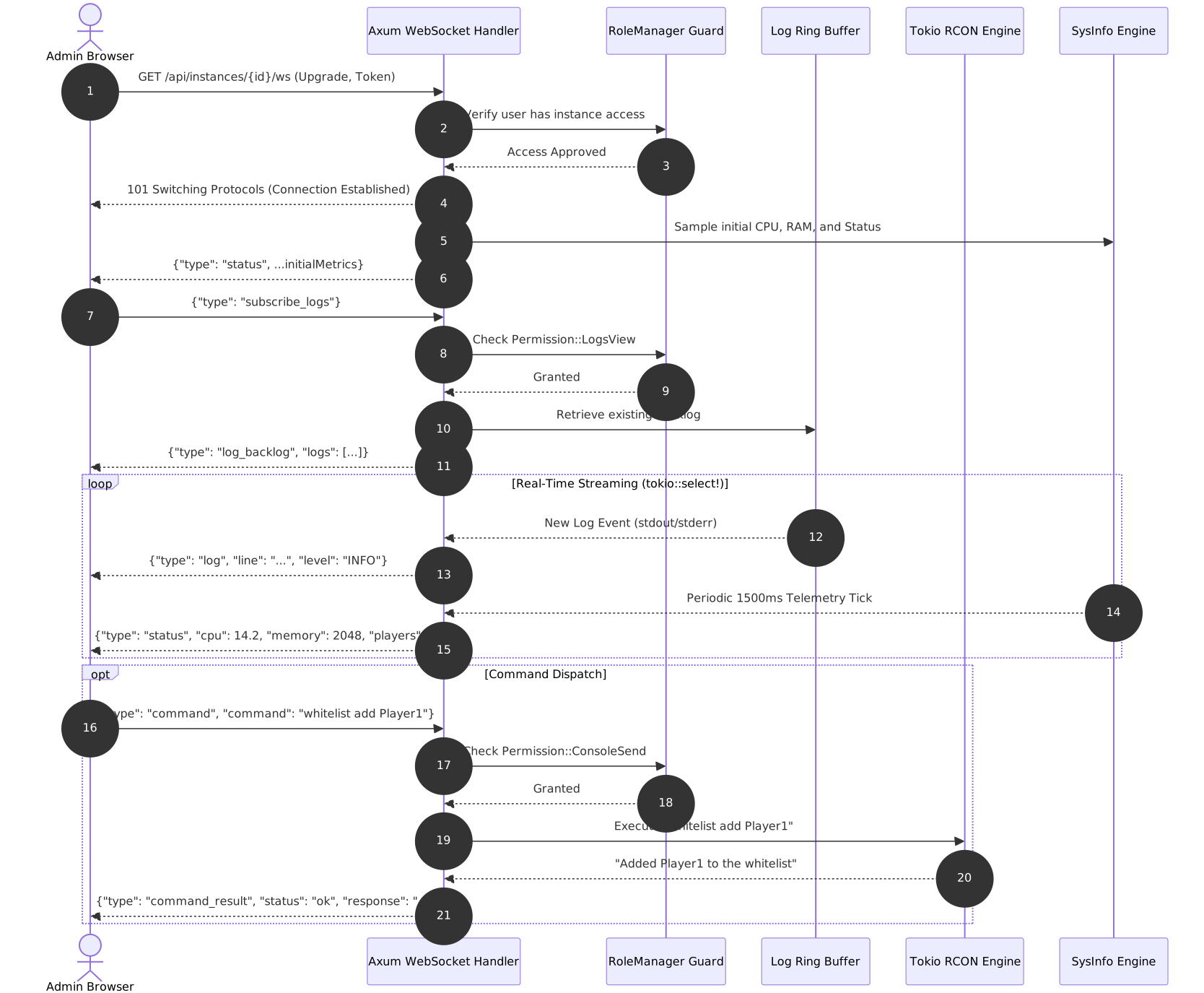
The socket checks you’re actually allowed to look at this instance before anything else happens. Then it hands you a quick snapshot of current status, so the console never opens to a blank void. Only once you explicitly ask to subscribe to logs does it check Permission::LogsView, grab what’s sitting in the ring buffer, and ship it over as one backlog packet. From there the connection just sits open, and a single async task juggles three things at once through tokio::select!: what you type, new log lines coming off stdout/stderr, and a telemetry tick every 1,500ms with fresh CPU, memory, and player counts.
I hadn’t even thought about this until it happened to me: what if the browser can’t keep up? World pregeneration or a chatty debug logger can throw log lines faster than a slow connection can absorb. I didn’t want that to mean a dropped connection or a stalled server. So when a client falls behind, the broadcast channel notices, log_rx.recv() comes back with a Lagged error and a count of what got skipped, and instead of panicking, McAdmin just catches the client up with a fresh snapshot from the ring buffer. From your side, it just looks like the log took a tiny breath and kept going.
Commands work the same way now. Type something into the console, it sends a {"type": "command", ...} frame straight down the socket, gets checked against Permission::ConsoleSend, gets forwarded to RCON, and comes back as a proper command_result frame instead of you sitting there wondering if it worked.
Small thing on paper. But it’s the difference between a panel that lists “real-time” as a feature somewhere in a README, and one that actually feels real-time at 1am when you’re wondering why a plugin just crashed.
Delegating Without Handing Over the Keys
Once friends started actually helping me run this instead of just playing on it, a problem showed up that I honestly hadn’t planned for. Someone wanted to moderate: kick a toxic player now and then, keep an eye on the whitelist, glance at the console when something felt off. None of that is unreasonable. But the only two options McAdmin had back then were “trusted with everything” or “trusted with nothing,” and neither one actually fit. Giving someone full admin just so they could kick a player felt like handing over the house keys because they needed to water one plant.
So I broke permissions apart into something a lot more specific: 18 individual switches across 7 categories, each gating exactly one action.
| Category | Permission | What it lets you do |
|---|---|---|
| Server Operations | server:start | Boot an offline instance |
server:stop | Gracefully stop a running instance | |
server:restart | Reboot an instance | |
| Logs & Console | logs:view | Read live console output and history |
console:send | Send console and RCON commands | |
| Player Management | players:view | See who’s online and registered |
players:kick | Disconnect an online player | |
players:ban | Ban or unban a player | |
players:op | Grant or revoke operator status | |
| Whitelist | whitelist:view | See who’s whitelisted |
whitelist:manage | Add or remove whitelist entries | |
| File Manager | files:read | Browse and view files |
files:edit | Modify config files | |
files:upload | Upload plugins, worlds, archives | |
files:delete | Permanently delete files or folders | |
| Server Properties | properties:view | Read server.properties |
properties:edit | Modify server.properties | |
| Team & Members | members:manage | Add, adjust, or remove other members |
Eighteen raw toggles is a lot to ask anyone to configure by hand, so I built presets on top instead of expecting people to click through checkboxes one at a time:

There’s a one-click “Make Admin” button on someone’s profile card for when I genuinely trust them with everything. There’s a Moderator preset covering the day-to-day stuff, starting and stopping servers, logs, console, kicking and banning, whitelist, reading files, viewing config, without ever touching delete or edit. There’s a Viewer preset for someone who just wants to watch. And if none of that fits, the full 18-switch panel is right there for anything custom.
None of this is just a frontend suggestion, either. Every protected route on the backend checks it for real:
user.require_permissions(&instance_id, &[Permission::ServerRestart], &state.role_manager).await?; If you’re missing it, the request stops right there with a 403 and a payload telling you exactly what was missing, not just a vague failure that makes you second-guess yourself:
{
  "error": "Forbidden: missing required permission: 'server:restart'",
  "missing_permissions": ["server:restart"]
}
On the frontend, the dashboard exposes those same permissions as plain booleans, canStartServer, canSendCommand, canDeleteFiles, and so on, so buttons you can’t use are just disabled with a tooltip explaining why, instead of quietly failing and leaving you wondering if the whole panel is broken.
Wrapping Up
None of this needed to be complicated, and yet here we are. What started as frustration over queue times and a 2 GB RAM ceiling on Aternos turned into a weekend Rust experiment, then a proper daemon and dashboard with real-time WebSockets and actual permission delegation, and now it’s something I trust enough to hand pieces of off to friends without lying awake worrying about it.
It’s still rough in places. The list of things I want to fix keeps growing instead of shrinking, which I’ve mostly made peace with. Maybe that’s just what side projects are. But it does the one job I built it to do, and it does it on hardware I already owned. Sometimes that’s enough.
If you want to poke around the code or run it yourself, it’s all up on GitHub .